
How to Get Started on Upwork and Get Your First Job


The year is 2026, and Upwork has grown into one of the largest marketplaces for independent work, connecting businesses with freelancers across more than 180 countries. In 2025, businesses spent about $4 billion through the platform, while Upwork ended the year with 785,000 active clients. The kind of work happening on the platform is changing too. AI-related work alone surpassed $300 million in annualised volume in the fourth quarter of 2025, growing more than 50% year over year.
But knowing that opportunities exist is only the starting point. If you're new to Upwork, you need to understand how the platform works, create a profile that shows what you can offer, find jobs that match your skills, and know how to turn a proposal into your first client and paid project. This guide takes you through that journey step by step.
Key takeaway on how to get started on Upwork
Getting started on Upwork involves creating a freelancer account, completing your profile, adding relevant work samples, finding jobs that match your skills, using Connects to submit proposals, and communicating with clients through the platform. If you're new to freelancing, you can still start without previous Upwork experience by building a focused profile and portfolio around the skills you can offer.
How Does Upwork Work for Freelancers?
Before creating an account, it helps to understand what Upwork is and how it operates. At its core, Upwork is a global freelancing marketplace where businesses and independent professionals connect. Clients use it to post projects or ongoing roles, and freelancers use it to offer their services across categories such as writing, design, development, marketing, consulting, customer support, finance, and many others.
The workflow is straightforward but structured. Clients publish jobs with details like scope, budget, and skills required. Freelancers then submit proposals that typically include a cover letter, suggested rate, and sometimes tailored answers to screening questions. Clients review these proposals, shortlist candidates, conduct interviews (either through chat, calls, or video directly on the platform), and then award contracts to the best fit. Contracts can be either hourly, where freelancers log time using Upwork’s desktop app for tracking, or fixed-price, where payments are released through agreed milestones.
Upwork plays the role of a trusted middle layer. It processes payments securely, offers built-in time tracking for hourly projects, and provides dispute resolution in case either party is unsatisfied. The platform also charges a service fee from freelancers on their earnings.
Beyond the basics of proposals and contracts, Upwork also uses a “Connects” system, a type of token that freelancers use to submit job proposals. New freelancers may receive free Connects through eligible onboarding activities or offers, and additional Connects can be purchased when needed. The number of Connects required varies by job, so understanding how they work is an important part of getting started on Upwork.
Another important feature is the Job Success Score (JSS), a performance metric that reflects your reliability and client satisfaction. This score, along with client reviews, plays a huge role in how easily you attract new projects.
How Do Freelancers Find Work on Upwork in 2026?
Businesses post projects on Upwork describing the work they need, their requirements and, in many cases, their budget and preferred experience level. Freelancers can search these listings using keywords, categories and filters to find opportunities that match their skills.
You don't need to apply for every job you come across. The goal is to identify projects where your skills and experience closely match what the client is looking for.
How Do Freelancers Apply for Jobs on Upwork?
Once you find a suitable project, you can submit a proposal explaining why you're a good fit. Depending on the job, Upwork requires freelancers to use Connects when submitting proposals.
Your proposal is your opportunity to show that you understand the client's needs, highlight relevant experience and work samples, and explain how you can help with the project.
How Do Freelancers Get Hired on Upwork?
If a client is interested in your proposal, they may message you to ask questions, discuss the project or arrange an interview. If you agree on the scope, price and other terms, the client can send you an offer, and you can begin working under an Upwork contract.
How Do Freelancers Get Paid on Upwork?
Upwork supports both hourly and fixed-price work, so the way you’re paid depends on the type of contract you have with the client. Once you complete work under an Upwork contract, payment is processed through the platform according to the contract type and Upwork's payment terms.
The process is straightforward: Create your profile → Find relevant jobs → Submit proposals → Get hired → Complete the work → Get paid
Getting familiar with these elements is essential because it shapes how you approach the platform. You’ll know where to find jobs, how to present yourself in proposals, how to communicate with clients professionally, and what steps to take to get from application to payment.
Now that you understand the process of how Upwork works, let’s look at how to get your own account, profile and portfolio ready to compete for those jobs.
🔗Do you know you can receive your Upwork payments in less than an hour with Raenest FastTrack? Try it out today.
How to Get Started on Upwork as a Beginner?
To start freelancing on Upwork, you'll need to create an account as a freelancer. Creating an Upwork account is free and only takes a few steps.
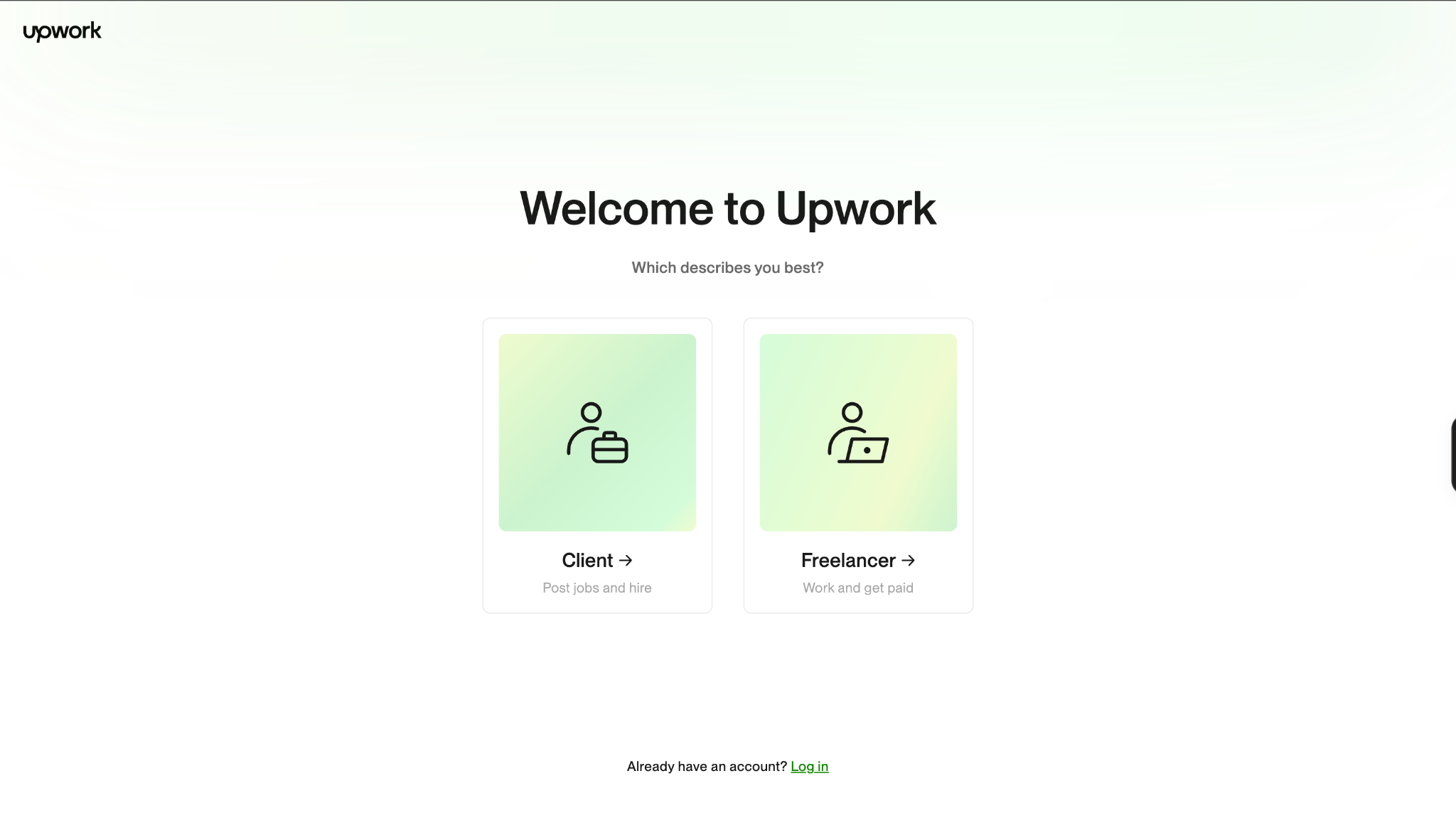
Go to the Upwork website and click Sign Up. When asked how you want to use Upwork, select “Freelancer. Work and get paid.” From there, follow the steps to create your account.
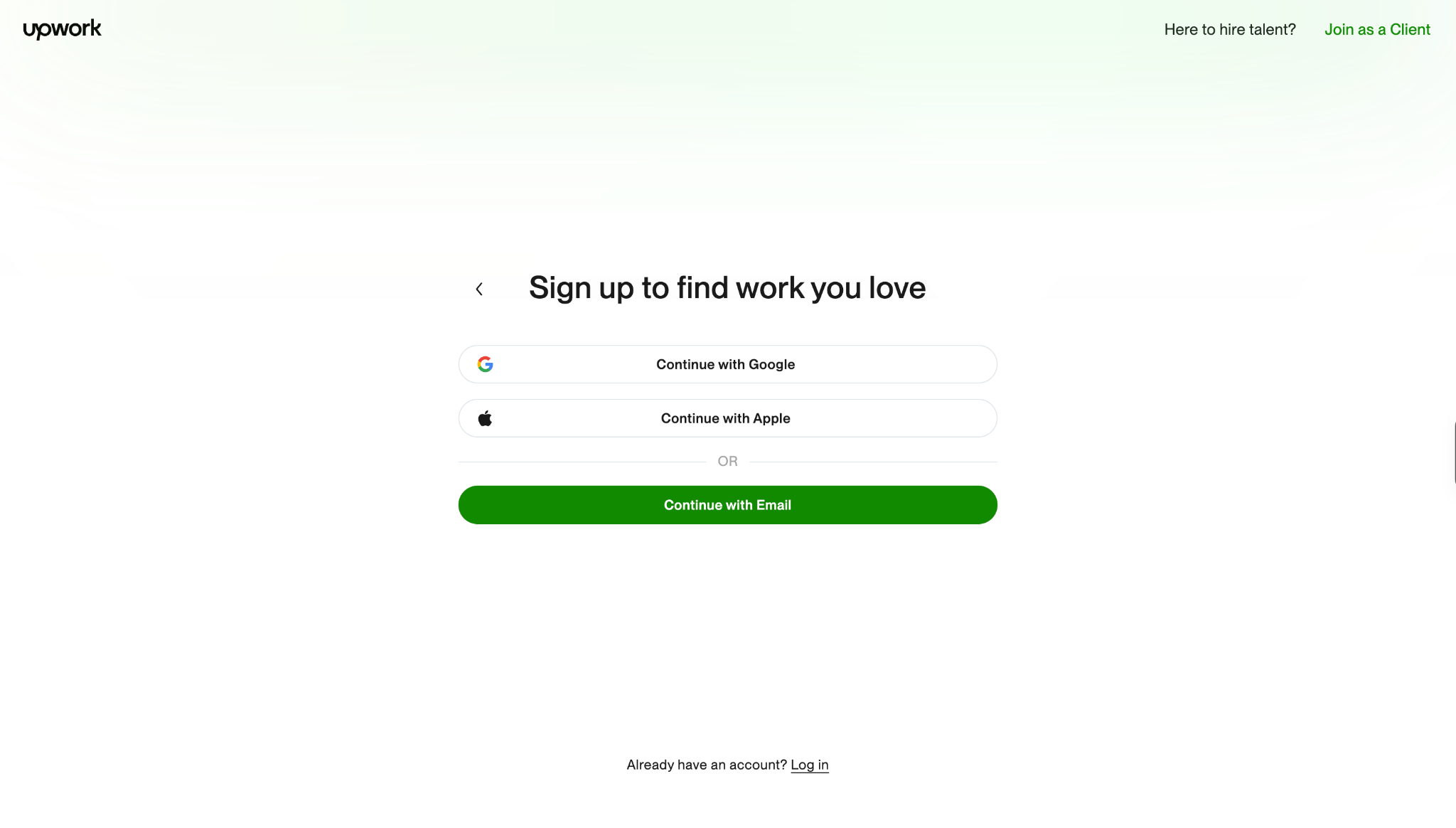
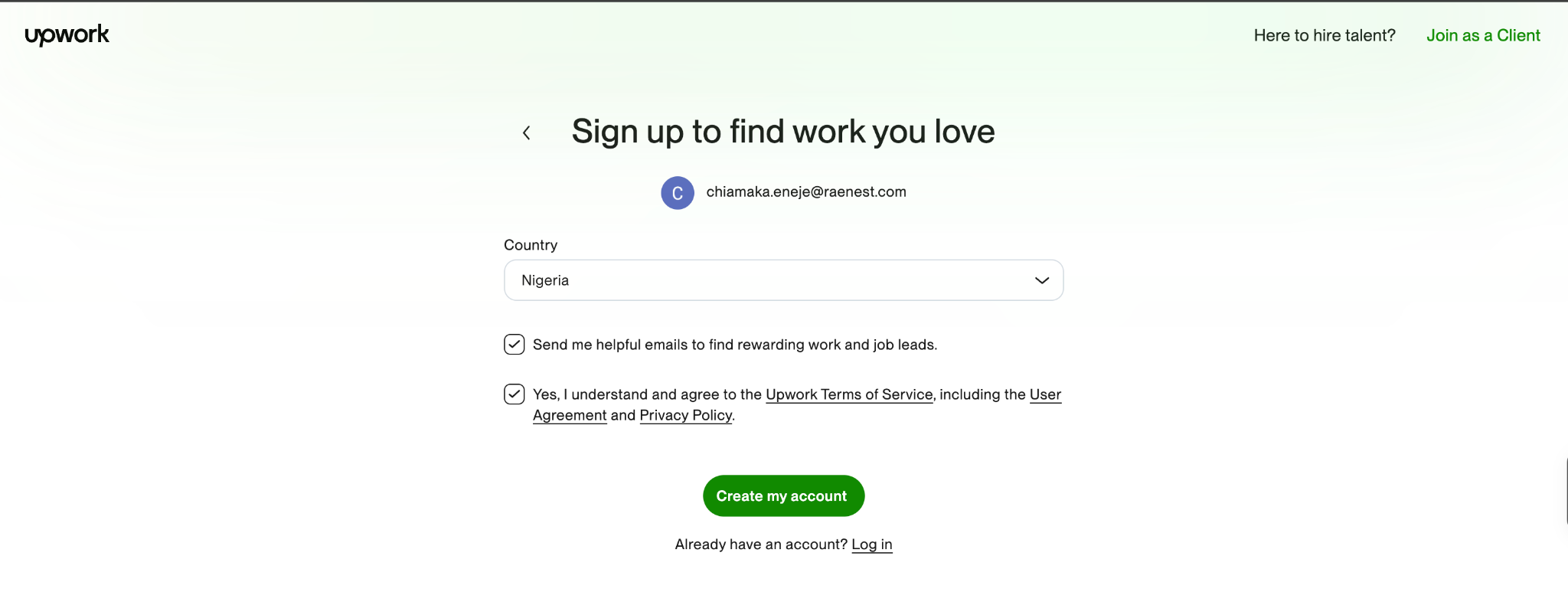
Take a minute to review the Upwork Terms of Service, including the User Agreement and Privacy Policy, before checking the box to continue. The terms help you understand how to work safely on Upwork and how the platform protects both clients and freelancers.
Once that’s done, follow these steps to begin setting up your freelancer profile.
1. Create Your Upwork Profile
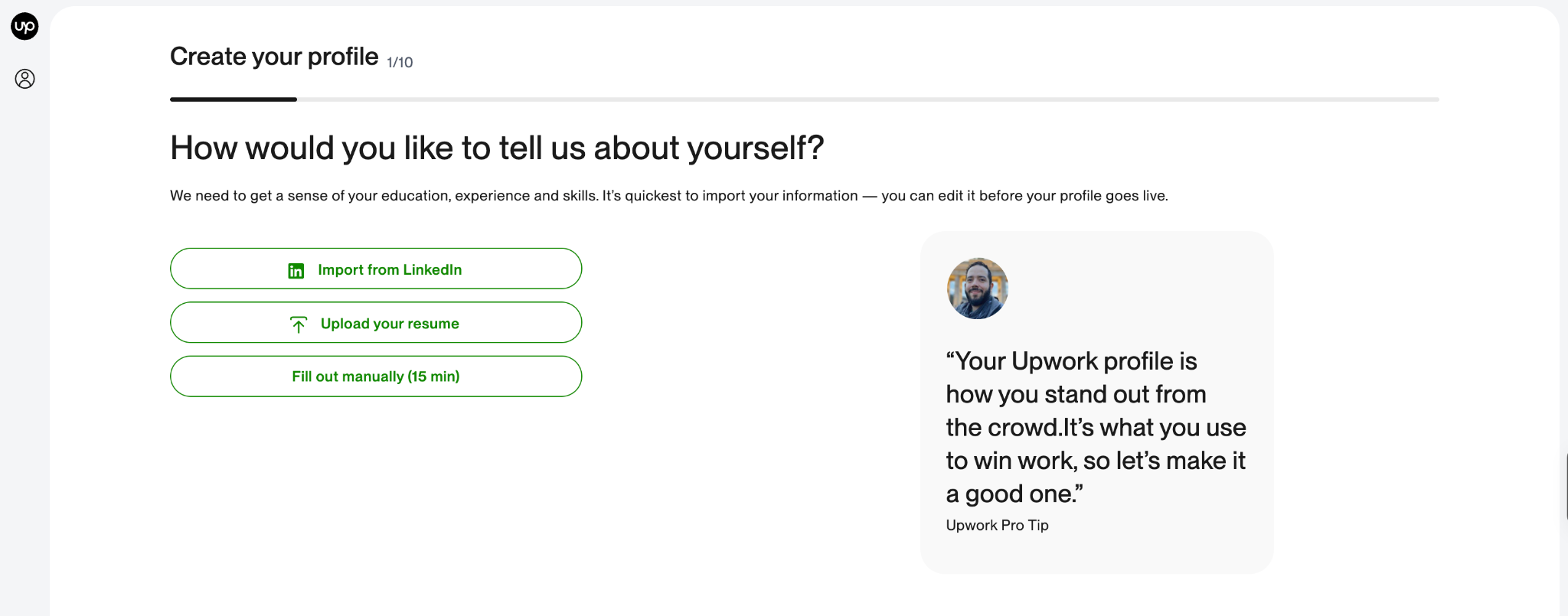
Your Upwork profile is one of the first things clients look at when deciding whether to consider your proposal, view your portfolio or contact you about a project. It should give potential clients a clear picture of what you do, the skills you offer and the kind of work you can deliver. To start applying for projects, you'll need to add these essential details to your profile:
- A profile photo
- A profile overview
- At least one employment history item
- At least one skill
- Your desired rate
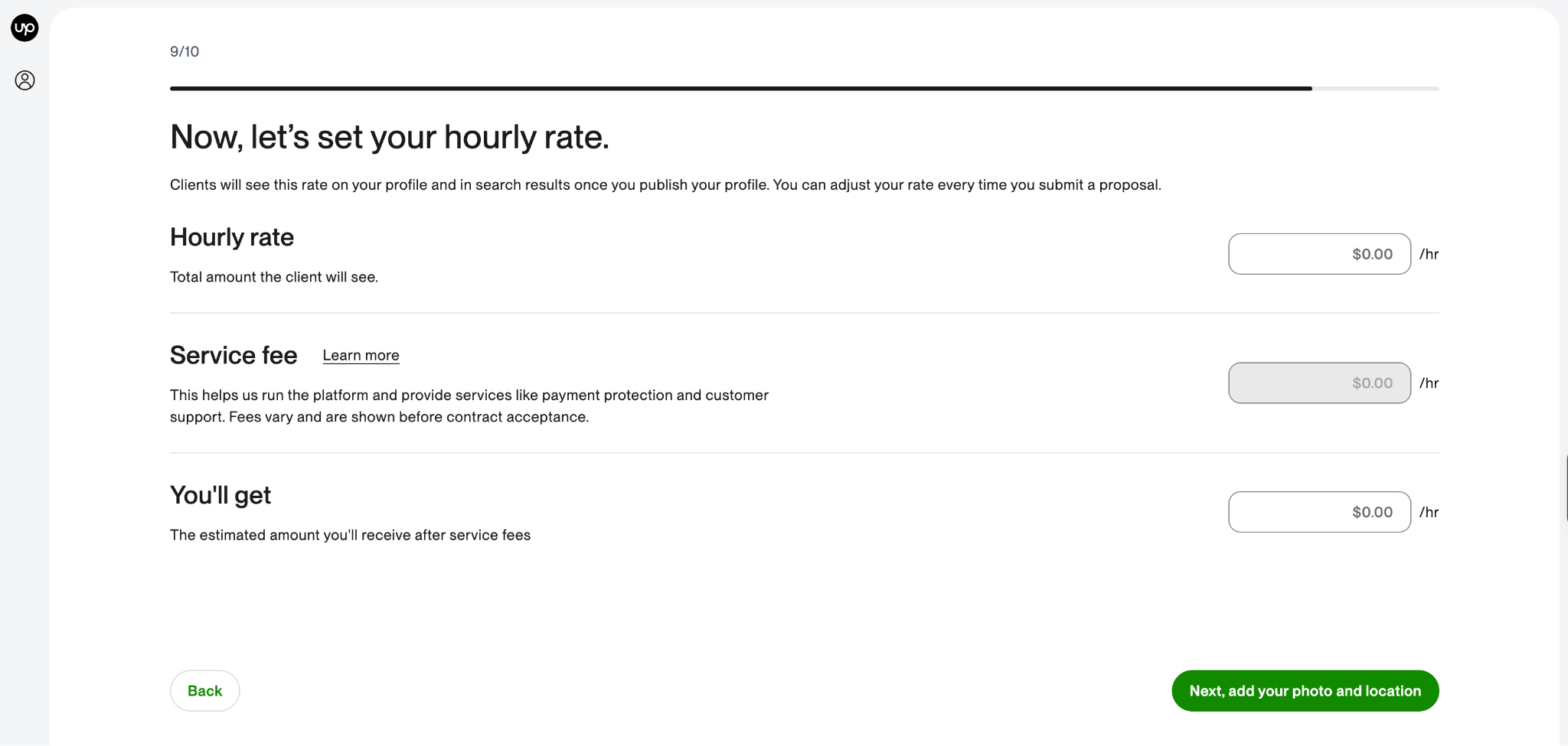
Once you've added these details, you can strengthen your profile with relevant education, portfolio samples, certifications, and other information that demonstrates your expertise.
Take your time to fill it out and preview it before you submit. A complete profile can also make you eligible for Upwork talent badges, which recognise certain freelancer achievements and qualities on the platform. As you build your experience and track record on Upwork, these badges can become another way to demonstrate your credibility to potential clients.
2. Find Jobs That Match Your Skills
Once your profile is ready, the next step is to find projects that match the skills and services you offer. On Upwork, go to Find Work and enter keywords related to the kind of work you want to do. You can also use filters and Advanced Search to narrow your results.
Don't limit your search to your exact job title. Think about how a client would describe the work they need and try related keywords. For example, a writer looking for content work could search for terms such as blog writer, content writer, SEO writer or article writer. Upwork recommends trying different keywords and using filters to refine the opportunities you see.
You can also save job searches so you can return to them later. Upwork currently allows freelancers to save up to 30 searches.
At this stage, don't worry about applying to every job you find. The goal is to identify projects where your skills are a strong match and where you can make a convincing case for why the client should hire you.
Next, we'll look at how to decide which Upwork jobs are worth applying for before you spend your Connects.
3. Choose the Right Upwork Jobs
Finding jobs on Upwork is only the beginning. Before you submit a proposal, take a close look at the job post to decide whether the project is a good match for your skills, experience and availability. Start by checking:
- The client's requirements: Do you have the skills and experience needed to complete the work?
- The project scope: Is the client clear about what they need you to deliver?
- The budget: Does the proposed budget make sense for the work involved?
- The client's history: Look at their previous hiring activity, reviews and other information available on their profile.
- The competition: Consider whether your experience and portfolio give you a relevant reason to apply.
You should also watch for potential red flags. Be cautious about clients who ask you to pay money to get a job, request sensitive personal information unnecessarily, or ask you to move payments or other important parts of the engagement outside Upwork. The goal isn't to apply for the largest number of jobs. Focus on projects where you can clearly show that your skills match what the client needs.
Once you've found a project that's worth applying for, the next step is to submit your proposal.
4. Submit Your Upwork Proposal
Once you've found a project that's a good match for your skills, you can submit a proposal through the job post. A proposal is your opportunity to show the client that you understand what they need and have the skills or experience to deliver it. Depending on the project, you'll typically need to provide:
- Your proposed rate or bid
- A cover letter
- Your estimated timeline
- Answers to any questions the client has included
- Relevant work samples, where appropriate
Most job proposals require Connects, Upwork's virtual tokens for submitting proposals. The number of Connects required can vary depending on the job, so check the application before submitting.
Your proposal should be written specifically for the project. Start by showing that you understand what the client needs, then explain how your skills and experience are relevant. If you have a portfolio piece that demonstrates similar work, include it.
Avoid sending the same generic proposal to every client. A relevant, well-written proposal gives the client a clearer reason to consider you. Don’t know how to create one yet? We have free proposal templates you can use.
Tip: Before you submit, read the job description again and make sure your proposal answers the client's actual requirements.
Once your proposal is submitted, the next step is to wait for the client to respond and turn that conversation into a potential job.
5. Get Hired by a Client
After you submit a proposal, the client may review your profile and proposal, then contact you if they want to discuss the project further. They may ask questions about your experience, request additional samples or invite you to an interview.
Use this conversation to understand the project clearly and show the client how your skills can help. Before agreeing to the work, make sure you understand:
- What the client needs you to deliver
- The project timeline and deadlines
- How much you'll be paid
- Whether the project is hourly or fixed-price
- Any milestones or specific requirements
If you and the client agree on the terms, the client can send you an offer through Upwork. Once you accept the offer and the contract begins, you can start working on the project.
Keep your communication and payments on Upwork, particularly before you have a contract in place. This helps keep the engagement within Upwork's platform protections and policies.
Now that you’ve landed your first job, it's time to complete the work and build your first successful Upwork project.
6. Complete Your First Upwork Job
Once your Upwork contract starts, your focus shifts from winning the project to delivering what you agreed to. Review the job requirements, confirm what you're expected to deliver and keep track of the agreed deadline. For a smooth first project:
- Confirm the scope: Make sure you understand exactly what the client expects.
- Follow the agreed timeline: Deliver the work by the deadline you committed to.
- Communicate clearly: Keep the client updated when necessary and ask questions if something is unclear.
- Follow the contract: Complete the work according to the agreed terms, milestones and deliverables.
- Review your work: Check your final deliverables before submitting them to the client.
- Handle revisions professionally: If revisions are included in the agreed scope, make the necessary changes and keep the project moving.
Your first project is also an opportunity to build your track record on Upwork. A successful project can contribute to your work history and help you establish a stronger profile for future clients.
Once you've completed the project and met the requirements of your contract, the final step is getting paid for your work.
7. Get paid on Upwork
After completing a project on Upwork, your earnings go through Upwork’s payment process before they become available for withdrawal. You can then withdraw your money using the payment methods available in your Upwork account.
As this is your first Upwork payment, it’s worth having a reliable way to receive your international earnings from the start. Raenest gives you a USD account for receiving your Upwork payments and a single place to manage your money after you get paid.
You can receive your Upwork payments in USD and manage them alongside other currencies, including GBP and EUR, as well as USDT and USDC. You can hold your earnings, convert them when you need to, spend from your balances with your Raenest card, or send money internationally.
Want to receive your earnings faster? You can use Raenest FastTrack to receive your Upwork withdrawals in under one hour. Create a free account on Raenest and have a reliable way to receive and manage your Upwork earnings from your very first payment.
Conclusion
If you made it this far, congratulations. You now know considerably more about getting started on Upwork than you did when you opened this article, which is a pretty good start.
It's important to note that your first Upwork job probably won’t come from sending one application and immediately hearing, “Where have you been all my life?” It usually takes a little more work than that and, as you'll expect, patience too.
The good news is that you don’t need years of Upwork experience to get started. The skills you already have count. So do the projects you’ve worked on, the experience you’ve gained elsewhere, and the work samples you can put in front of a potential client. You can build your Upwork track record one project at a time.
Start with one clear service. Build a profile that makes sense. Apply for work that genuinely fits your skills rather than applying to everything with a pulse. Then use each project to make the next one a little easier.
Frequently Asked Questions About Getting Started on Upwork
- Can I Start on Upwork With No Experience?
Yes. You can create an Upwork profile without previous Upwork experience. If you don't have freelance client work to showcase, you can use relevant employment experience, personal projects and portfolio samples to demonstrate your skills.
- How Do I Get My First Upwork Job With No Reviews?
You can start without Upwork reviews. Use your profile, portfolio and proposal to demonstrate your ability instead. Applying for smaller or clearly defined projects that match your experience can also give you opportunities to build your first work history.
- Is Upwork Free for Beginners?
Creating an Upwork freelancer account is free. However, freelancers may need Connects to submit proposals, and Upwork charges freelancers a service fee on earnings. The applicable fees and Connects requirements can change, so check Upwork's current pricing before applying.
- How Many Connects Do I Need to Get My First Job on Upwork?
There isn't a fixed number of Connects required to get your first job. The number of Connects needed to submit a proposal varies by job, so the better approach is to use them selectively on projects where your skills are a strong match.
- How Many Jobs Should I Apply for on Upwork as a Beginner?
There is no guaranteed number of applications that leads to your first job. Rather than focusing on application volume, prioritise relevant projects where you meet the client's requirements and can submit a strong, personalised proposal.
- What Is the Easiest Job to Get on Upwork for Beginners?
There isn't one job that is universally easiest to get. Your best opportunities are generally projects that match skills you can already demonstrate through your experience or portfolio.
- What Skills Are in Demand on Upwork for Beginners?
Demand varies by category and changes over time. Upwork has opportunities across areas including writing, design, marketing, customer support, software development, virtual assistance and AI-related work. Choose a service based on the skills you can genuinely demonstrate rather than choosing a category simply because it appears popular.
- How Long Does It Take to Get Your First Job on Upwork?
There is no fixed timeline. Some freelancers may receive a response quickly, while others may need time to improve their profile, refine their proposals and find better-fitting opportunities. Your results can depend on your skills, experience, portfolio, the jobs you apply for and how competitive those projects are.
- Why Am I Not Getting Jobs on Upwork?
If you're sending proposals without getting responses, review the jobs you're applying for, your profile, portfolio and proposals. Make sure you're applying to projects that genuinely match your skills and that each proposal addresses the client's specific requirements.
- Can I Get an Upwork Job Without Paying for Connects?
Connects are generally required to submit proposals to jobs, although Upwork may provide or offer Connects through different means, and some opportunities may not require them. Check the current requirements shown when you apply for a specific job.

.jpg)