.jpg)

Upwork Badges: What They Mean, Requirements and How to Get Them


If you’ve spent any time on Upwork, you’ve probably noticed the badges next to some freelancers’ names. These are Upwork talent badges, and they recognise freelancers and agencies for factors such as their performance, experience, and client satisfaction on the platform. They also give potential clients a quick way to understand a freelancer’s track record and standing before they open their profile.
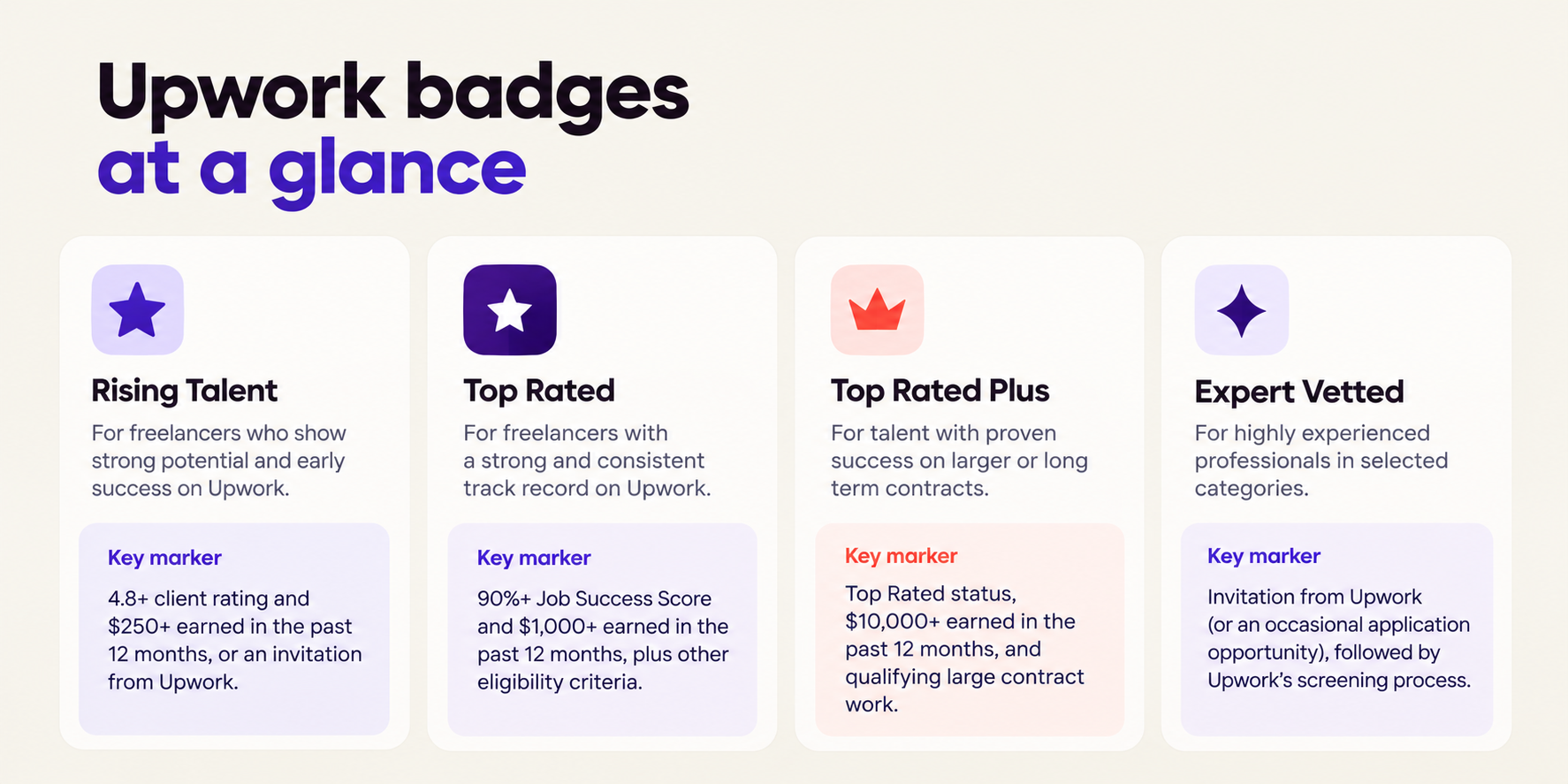
There are four main talent badges on Upwork: Rising Talent, Top Rated, Top Rated Plus, and Expert Vetted. Each badge recognises a different stage or type of professional experience and comes with its own eligibility criteria. Expert Vetted follows a separate process, with eligible professionals invited to complete Upwork’s screening process.
If you’re working towards a badge yourself, the obvious questions are: How do you earn an Upwork talent badge? And does having one make it easier to win clients?
The answer depends on the badge you’re working towards and the track record you’ve built on Upwork. Here’s what each badge means, what Upwork looks for, and what you need to do to work towards earning one.
Rising Talent Upwork badge
If you’re relatively new to Upwork, Rising Talent is one of the first badges you may be eligible for. It highlights freelancers who show strong potential through their background, skills, and early success on the platform.
How to get the Rising Talent badge on Upwork
There are two ways to become eligible for Rising Talent. Upwork can invite you to receive the badge, or you can qualify based on its eligibility criteria. For freelancers, Upwork currently requires you to:
- Have an average star rating of 4.8 or higher and have earned at least $250 in the past 12 months, unless you have been invited by Upwork
- Maintain a 100% complete profile with accurate skills and genuine work
- Have submitted a proposal or worked on Upwork within the past 90 days
- Have a Job Success Score of 90% or higher, if you have earned a JSS. You can qualify for Rising Talent before you have a JSS
- Have no account holds
- Have no negative feedback from clients
- Have an identity verification badge
- Have a valid withdrawal method added to your account
- Follow Upwork’s Terms of Service
Upwork also considers factors such as your skills, professional background, previous experience, and work completed on the platform when assessing Rising Talent eligibility.
Meeting the criteria makes you eligible for consideration, but you cannot add the badge to your profile yourself. Upwork awards the badge to eligible talent.
What do you get with the Rising Talent badge?
Once awarded, the Rising Talent badge appears on your profile and projects. Upwork also gives Rising Talent freelancers a one-time bonus of 30 free Connects and the ability to offer consultations to clients.
How to keep your Rising Talent badge
Your eligibility continues to depend on your standing and activity on Upwork. Keep your profile complete and accurate, stay active on the platform, submit proposals that match your skills, and maintain a strong record with clients.
Rising Talent can also be an early step towards building the work history needed for Top Rated status.
🔗Did you know you can receive your Upwork Payouts in less than an hour with Raenest FastTrack? Learn more about Raenest FastTrack here.
Top Rated Upwork badge
Top Rated recognises freelancers and agencies that have built a strong reputation through consistent positive client feedback. Upwork says Top Rated talent represents the top 10% of talent on the platform.
Top Rated requirements on Upwork
For freelancers, Upwork currently requires:
- A Job Success Score of 90% or higher
- Your first Upwork project to have been completed more than 90 days ago
- A JSS of at least 90% for 13 of the last 16 weeks, or maintained Rising Talent status during that period
- A 100% complete profile
- At least $1,000 earned in the past 12 months
- Up-to-date availability
- An account in good standing with no recent account holds
- Activity on Upwork within the past 90 days, such as submitting a proposal, accepting an invitation, or earning money through the platform
Upwork reviews eligibility every two weeks, so Top Rated status reflects your current standing rather than a permanent achievement.
How to maintain Top Rated status
Once you have Top Rated status, the same fundamentals continue to matter. Keep your JSS at 90% or higher, stay active on Upwork, keep your profile and availability up to date, and maintain an account in good standing.
Your badge can also be affected by serious violations of Upwork’s rules. For example, Upwork says directing or accepting payments outside its payment system, or repeatedly communicating off-platform before a contract is in place, can result in losing Rising Talent, Top Rated, or Top Rated Plus status.
What do you get with Top Rated?
Top Rated freelancers receive a badge displayed on their profile and projects, access to Job Digest emails, faster payments on hourly contracts, and the ability to offer consultations.
Top Rated Plus Upwork badge
Top Rated Plus is for freelancers and agencies that have demonstrated strong performance on larger or long-term contracts. Upwork says Top Rated Plus represents the top 3% of performers on the platform.
Top Rated Plus requirements
To qualify as an individual freelancer, you must maintain Top Rated status and meet additional requirements:
- Total earnings of more than $10,000 in the past 12 months
- Work or ongoing work on one or more large contracts in the past 12 months
- No negative outcomes on the qualifying large contract
- Continued strong performance and client feedback
The definition of a large contract varies by category. For freelancers, Upwork currently lists thresholds ranging from $5,000 to $15,000, depending on the type of work. For example, the threshold is $5,000 for Writing, Design and Creative, Engineering and Architecture, Legal, and Translation, while Web, Mobile and Software Development has a $15,000 threshold.
That means earning more than $10,000 overall is only part of the requirement. Your track record also needs to include qualifying large contract work.
How to work towards Top Rated Plus
Start by maintaining the requirements for Top Rated while building experience with larger or longer-term engagements. The goal is to establish a track record across multiple clients while successfully managing contracts that meet Upwork’s definition of a large contract.
Top Rated Plus status is reviewed against current eligibility, so maintaining the underlying requirements remains important after you earn the badge.
Expert Vetted Upwork badge
Expert Vetted recognises highly experienced professionals in selected categories. Upwork says Expert Vetted talent represents the top 1% of talent on the platform.
The process is different from the other badges. You generally cannot simply apply for Expert Vetted when you decide you want it. Upwork typically invites professionals it considers suitable for the programme, although it says it may occasionally offer opportunities to apply proactively.
How to become Expert Vetted on Upwork
If you receive an invitation, you go through Upwork’s screening process. The evaluation can assess both your professional expertise and your ability to work effectively with clients.
Upwork says candidates must:
- Demonstrate exceptional expertise in their field
- Pass a screening process with Upwork Talent Managers
- Demonstrate strong soft skills, including communication
The screening process can include skills assessments and an interview. Expert Vetted is only available in selected categories, and Upwork says those categories can change over time.
Who can see the Expert Vetted badge?
The Expert Vetted badge is visible to Business Plus and Enterprise clients. Expert Vetted talent can also appear in expert-level searches and receive priority access to certain opportunities.
Do Upwork badges help you get clients?
A badge can give potential clients an additional signal when they’re evaluating freelancers. Upwork itself says talent badges can help professionals stand out to clients, appear in search and proposal results, and build credibility on the platform.
The badge is still one part of your profile. Clients can also look at your portfolio, relevant experience, reviews, Job Success Score, proposal, availability, and fit for the project.
So, earning a badge can strengthen how your profile is presented, but the badge itself does not replace the work and track record that support it.
Frequently asked questions about Upwork badges
- What are the four Upwork badges?
The four main Upwork talent badges are Rising Talent, Top Rated, Top Rated Plus, and Expert Vetted. Each one recognises a different level or type of professional experience and performance on the platform.
- How do I get a badge on Upwork?
The process depends on the badge. Rising Talent, Top Rated, and Top Rated Plus have specific eligibility criteria, while Expert Vetted generally begins with an invitation and screening process.
- Can I add an Upwork badge to my profile myself?
No. Upwork awards talent badges to eligible freelancers and agencies. You cannot manually add one to your profile.
- What is the difference between Rising Talent and Top Rated?
Rising Talent recognises newer freelancers who show strong potential and early success. Top Rated recognises talent that has built a stronger and more established record on Upwork and meets the platform’s Top Rated requirements.
- What is the difference between Top Rated and Top Rated Plus?
Top Rated focuses on maintaining a strong overall reputation and performance on Upwork. Top Rated Plus requires those Top Rated standards plus qualifying experience with large contracts and more than $10,000 in earnings over the previous 12 months.
- Can I apply for Expert Vetted?
Expert Vetted is typically invitation-only, although Upwork says it may occasionally offer opportunities to apply proactively. If invited, you must complete the required screening process.
- Can you lose an Upwork badge?
Yes. Upwork reviews eligibility regularly, and your status can change if you no longer meet the relevant requirements. Upwork also states that certain violations of its Terms of Service can result in losing Rising Talent, Top Rated, or Top Rated Plus status.
- Does a higher Upwork badge guarantee more clients?
No badge guarantees work. Badges can help signal your experience and standing on the platform, but clients still evaluate factors such as your skills, portfolio, reviews, proposal, and suitability for the project. Upwork describes talent badges as a way for professionals to stand out to clients, rather than a guarantee of being hired.
Building a freelancing career with Raenest
Your Upwork badge reflects the track record you build on the platform. As you take on more projects, build your reputation, and grow your earnings, having the right setup to receive and manage those payments matters too.
With Raenest Global Accounts, you can receive and manage international payments in USD, GBP, and EUR, including payments from platforms such as Upwork. You can also use your USD account to receive payments from clients and other platforms that support USD bank deposits. And when you want faster access to your Upwork earnings, Raenest FastTrack lets you receive Upwork withdrawals in under an hour
So while you’re building the profile, reputation, and work history that can earn you an Upwork badge, Raenest helps you receive and manage the money that comes from that work. Manage your global earnings with Raenest.
🔗Also read: How to update your payment details on Upwork and Fiverr