.webp)
How to Pay for Spotify Premium in Nigeria

So, you’re vibing to your favourite jams on Spotify, but ads keep ruining the flow? You’re not alone. No one likes to have their mood interrupted. Whether you're jamming to Afrobeats, hip-hop, R&B, or catching up on podcasts, there’s nothing worse than having your groove cut off by an ad.
That’s why Spotify Premium is awesome. With it, you can kiss those interruptions goodbye. No more ads, just smooth, uninterrupted listening. But here’s the catch, if you’re in Nigeria, paying for Spotify Premium can be tricky because of the restrictions on Naira debit cards. But don’t worry; we’ve got a solution that’ll have you subscribed to Spotify Premium instantly.
Key takeaway on how to pay for Spotify Premium
You can pay for Spotify Premium in Nigeria using a Nigerian debit card, a virtual dollar card or a Spotify gift card. Spotify Premium currently costs ₦1,600/month for Individual, ₦800/month for Student, ₦2,100/month for Duo, and ₦2,500/month for Family. Eligible new users can also get 3 months of Premium Individual for free, while eligible students can get 1 month free. If your Nigerian debit card is declined, the Raenest Virtual Dollar Card is a reliable way to pay for Spotify Premium.
Why Do Many Nigerians Love Spotify?
Let’s face it, Spotify isn’t just another music app. It’s like having a personal DJ that gets you. It’s there for you when you're working, working out, chilling, or just in need of background vibes. Their personalised mixes are a game-changer. Spotify knows when you need some chill lo-fi beats, or when you’re ready to turn up with some energetic Afrobeats. It’s like the app knows what’s on your mind—and your playlist—before you do. It also works for both apple and android phones.
In Spotify's latest campaign, “What’s on Your Spotify”, members of the creative community like influencers and creators shared what they’re listening to and what makes their playlists unique. So with Spotify, It’s not just about the music; it’s about the stories behind the tracks, the moods they evoke, and how the platform perfectly curates a playlist for every moment.
The Issue with Naira Cards
Now, here’s the thing: While Spotify offers fantastic free trials (up to three months, by the way), paying for that Premium subscription afterward with your Naira debit card can be a headache. Due to local regulations and restrictions, many Nigerians are left stranded when trying to subscribe to international services like Spotify.
But don’t stress, because that’s where the Raenest virtual dollar card comes in. With it, you can easily pay for Spotify Premium without worrying about card restrictions. The best part is you can create your virtual card instantly and use it right away for any online international purchase—whether it's Spotify Premium, Apple music, Netflix, or anything else.
How to Subscribe to Spotify Premium in Nigeria
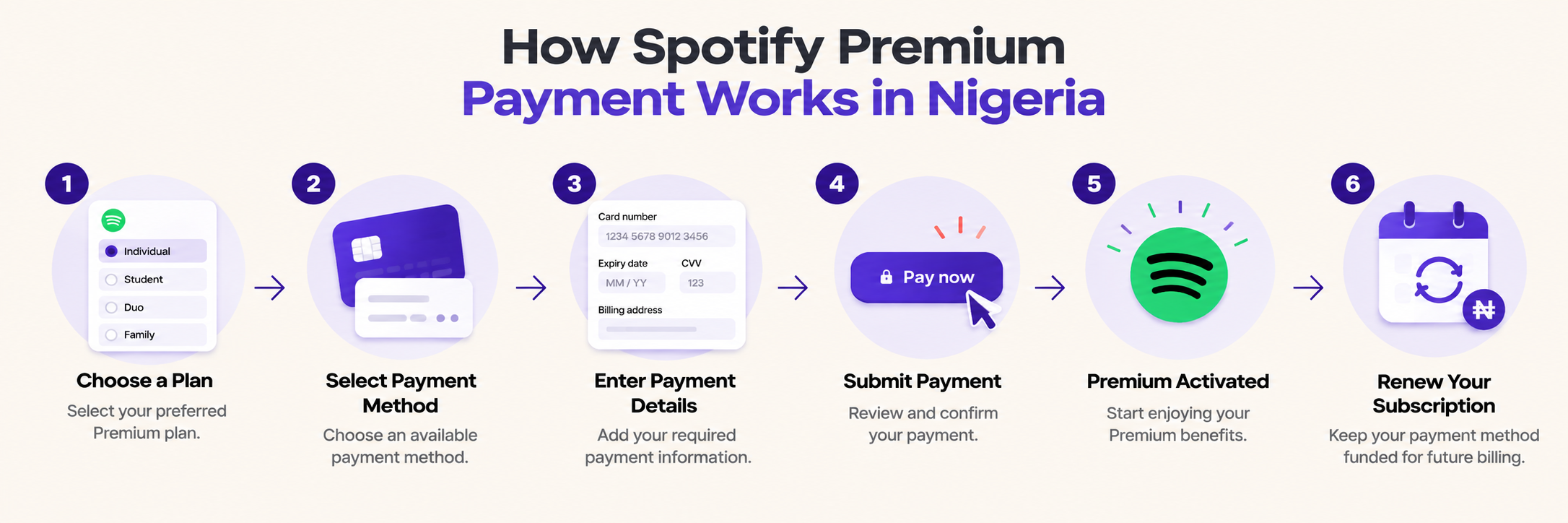
Let’s walk you through how to pay for Spotify Premium in Nigeria using the Raenest Virtual Dollar Card.
- Download and Sign Up for Raenest: If you don’t already have a Raenest account, download the app, sign up, and get verified. It’s simple and fast.
- Create Your Virtual Dollar Card: Once verified, head to the Cards section and create your virtual dollar card. Make sure your card is funded to cover the monthly subscription.
- Open Spotify on Your Laptop: Spotify Premium subscriptions can’t be made on mobile, so you’ll need to do this on a desktop or laptop. Open Spotify, log into your account, and click on Premium.
- Select Your Premium Plan: Choose from the available plans. We recommend the Premium Individual plan, which offers three months free and costs just ₦900 per month afterward. You could also consider the Student plan for ₦450 per month, the Duo plan for couples, or the Family plan if you want to share with up to six people.
- Change Your Country to the United States: Once you’ve selected your plan, scroll down to where it shows your country. Change it from Nigeria to the United States.
- Enter Your Raenest Virtual Dollar Card Details: Next, select “Credit or Debit Card” as your payment method. Open your Raenest app, tap on your virtual dollar card, and click “View Card Details.” Copy the card number, expiry date, and CVV, as well as the US billing address provided by Raenest, and paste them into the payment form on Spotify.
- Enjoy Your Music: Once you hit “Buy Now,” you’ll be all set with three free months of Premium Spotify. After that, your virtual dollar card will be charged ₦900 monthly, so you have uninterrupted ad-free listening.
Recommended Tips to Keep the Music Playing
- Fund Your Card Regularly: Ensure your virtual dollar card has enough funds to cover your monthly subscription. You can fund it from your USD, GBP, Euro, or even Naira wallet on Raenest.
- Avoid Payment Failures: If your card is declined multiple times due to insufficient funds, Raenest may block your payment method. So keep an eye on your balance and top up when necessary.
- Stay Secure: Your Raenest virtual dollar card is 3D Secure, so you don’t have to worry about safety when making international payments. But still, keep your card details private and secure.
Frequently Asked Questions
- What payment methods can I use to pay for Spotify Premium in Nigeria?
Spotify shows the payment methods available for your account and location after you select a Premium plan. Available options can vary by country and account, so check the payment methods displayed at checkout before completing your subscription.
- Why is my Nigerian debit card not working on Spotify?
Your card may be declined if it does not support foreign, secure online, or recurring payments, does not have enough funds, has expired, or is not registered in the same country as your Spotify account. Check your card settings and payment details, or try another available payment method.
- Can I use a virtual dollar card to pay for Spotify Premium in Nigeria?
Yes. A virtual dollar card like the Raenest dollar card can be used for Spotify Premium when it is accepted as a payment method for your account and location. It can be a useful alternative if your Nigerian debit card does not support the required international or recurring transaction.
- Can I pay for Spotify Premium with a Naira debit card?
Yes, provided your debit card is accepted by Spotify and supports the required transaction. Spotify says recurring card payments must be supported by the card, and the card's issuing country should match the country on your Spotify account.
- How much does Spotify Premium cost in Nigeria?
Spotify Premium currently costs ₦1,600/month for Individual, ₦800/month for Student, ₦2,100/month for Duo, and ₦2,500/month for Family. Eligible new Individual users can get three months for ₦0, while eligible students can get one month for ₦0 before the regular monthly price applies.
- Can I pay for Spotify Premium without a credit card?
Yes. Spotify supports different payment methods depending on your country or region. These can include debit cards and other payment options, but the methods available to you will be shown after you select a Premium plan.
- What should I do if my Spotify payment is declined?
If your Nigerian debit card is declined when paying for Spotify Premium, try using the Raenest Visa USD Card instead. The card is linked directly to your Raenest balances, so you don't need to fund the card separately before making a payment.
You can set your preferred spending order across your USD, GBP, EUR and NGN balances, and Raenest automatically charges the first eligible balance with enough funds. Simply enter your Raenest card details at Spotify checkout and complete the payment. The card also supports eligible subscriptions and recurring payments, making it a convenient option for Spotify Premium. Create yours today if you don’t have one.
- Can I change my Spotify payment method after subscribing?
Yes. You can change your payment method from your Spotify account by going to your payment methods and adding or changing your card. Spotify may place a temporary authorisation charge when you add a new payment method to verify it.
- Does Spotify Premium automatically renew after the free trial?
Yes. If you are eligible for a free trial, you still need to provide a valid payment method. If you don't cancel before the trial ends, Spotify will charge your selected payment method at the applicable Premium price and your subscription will continue. Spotify says it sends a reminder seven days before the trial ends.
- Do I need to change my Spotify country to pay with a virtual dollar card?
No. You should not change your Spotify country simply to use a different payment method. Spotify says your account country or region should reflect where you live, and a payment method for a recurring subscription should be registered in the same country as your Spotify account.
Final Thoughts: Don’t Miss Out on Spotify Wrapped
Let’s be real—if you’re not on Spotify by the end of the year, you’re missing out big time. Everyone loves sharing their Spotify Wrapped, showing off what they’ve been jamming to all year long. Whether it's your top artists or that one song you played 100 times in a week (we’ve all been there), Spotify Wrapped is a fun way to look back on your musical journey. And if you want to get in on the action when the year ends, subscribing to Spotify Premium now is your golden ticket.
So, what’s on your Spotify? Subscribe and start listening now with the Raenest Virtual Dollar Card.
.jpg)