.jpg)

How Indian Freelancers Can Receive Upwork Payments in Under an Hour with Raenest FastTrack


Freelancing in India is growing fast, and platforms like Upwork have made it easier than ever to work with clients around the world, deliver projects on time, and build a steady income. Yet when it comes to payouts, many freelancers still find themselves waiting days after a project is approved.
That delay can be frustrating, especially when you need timely access to money you’ve already earned. Raenest FastTrack changes that. With FastTrack, you can now receive your Upwork payments in under an hour, directly into your Raenest bank account, without the usual delays or extra steps.
How Upwork Payments Work for Indian Freelancers
After a client approves your work on Upwork, your earnings go through a short security period. Once this period ends, the funds become available for withdrawal, and you can choose from several payout options.
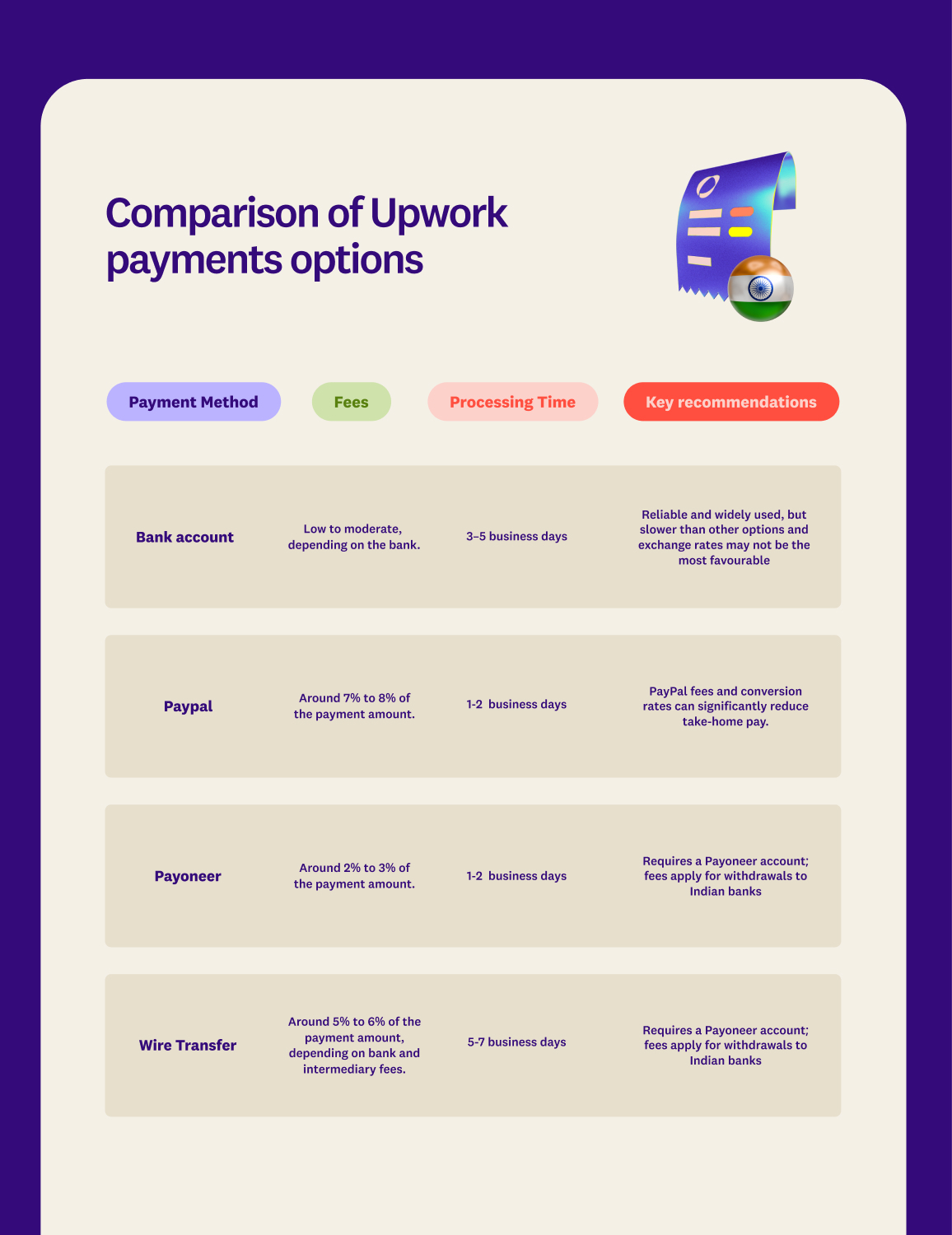
- Bank account: A simple and commonly used option. Transfers typically take three to five business days, depending on your bank and local processing timelines.
- PayPal: Often faster than direct bank transfers, but fees and currency conversion charges can reduce the amount you receive in INR.
- Payoneer: Generally quicker than local bank transfers. Withdrawals may take one to two business days before the funds are usable.
- Wire Transfer: Best suited for larger withdrawals. While reliable, this option is usually slower and comes with higher fees, making it less ideal for frequent payouts.
These methods give you flexibility; however, their processing times and costs vary across options.
Upwork payment options comparison and fees
Also read: How to get started on Contra: A beginner’s guide.
How To Get Upwork Payments In Under an Hour
As an Indian freelancer seeking faster access to your Upwork earnings, Raenest has introduced a feature called FastTrack, designed to feel familiar while significantly reducing wait time. Here's how FastTrack works
- Create an account on Raenest if you don’t have one
- Log in to your Raenest account and create your USD account
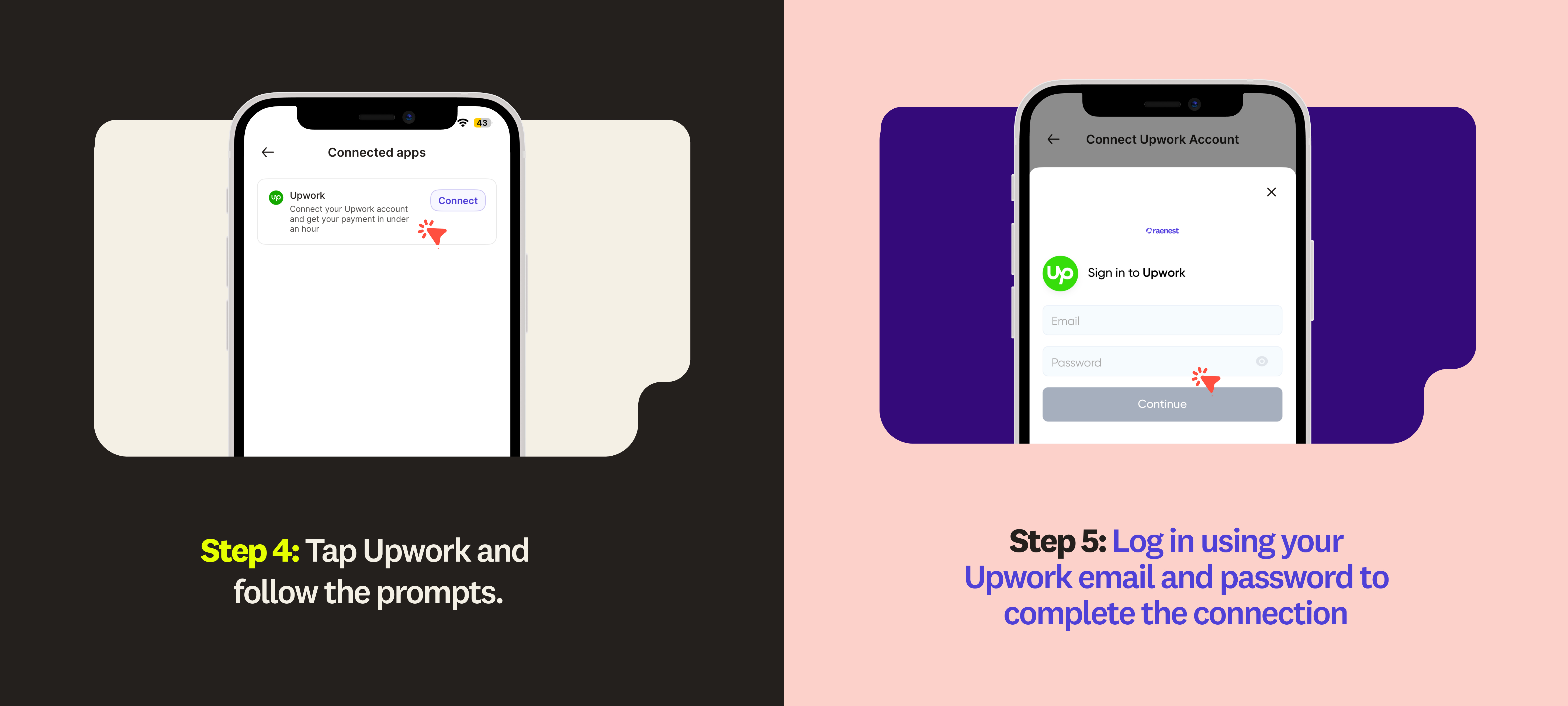
- Connect your Raenest profile to your Upwork account.
- Any eligible withdrawal made from that connected account is delivered to your Raenest account in under an hour.
How to connect your Upwork account
.jpg)
Important limits to know
- FastTrack withdrawals apply only to payments sent to your Raenest bank account.
- The maximum eligible amount is up to $1,500 USD on weekdays (Monday to Friday).
- The maximum eligible amount is up to $500 USD on weekends (Saturday and Sunday).
- Withdrawals above these limits are processed as regular Upwork payments and typically reflect within 24 hours.
- Terms and conditions apply.
If your Upwork account uses Google Sign-In, you’ll need to switch to email and password login before connecting.
How to disable Google SSO on Upwork
- Log in to your Upwork account.
- Click your avatar in the top right corner.
- Select Account Settings.
- Go to Password & Security.
- Under 'Login with Google', click 'Disconnect'.
- Set a new password and sign in using your email and password.
Once this is done:
- Return to the Raenest app or web dashboard.
- Go to Connected Apps.
- Select Upwork and follow the prompts to reconnect.
After connecting, you can initiate withdrawals from Upwork to your Raenest account and see your payment reflected in under an hour.
Why Choose Raenest to Receive Your Upwork Payments
- Faster withdrawals: Receive Upwork payments in under an hour.
- Low fees: Keep more of your hard-earned money with minimal conversion and transaction fees.
- Multi-currency support: Receive payments in USD, GBP, or EUR, and convert to INR instantly.
- Reliable and secure: Fully regulated, compliant, and secure.
- Easy to use: Set up in minutes and integrate seamlessly with Upwork.
Raenest makes receiving Upwork earnings seamless and, with FastTrack, faster on any day, including the weekends, at no extra cost. If you don’t have a Raenest account yet, create one for free, link it to Upwork, and start receiving payments in minutes.