.jpg)

Raenest vs Payoneer


If you're a freelancer, remote worker, or digital entrepreneur, chances are you've used Payoneer at some point to receive payments from international clients. And if you're reading this, you probably also use Raenest to withdraw, convert, or even make payments.
That setup works, but here’s the thing: it’s costing you more than it should.
Instead of receiving your payments via Payoneer and then moving them to Raenest, why not get paid directly through Raenest and keep more of your money? In this blog, we’ll take a detailed look at Payoneer vs Raenest, covering their features, costs, exchange rates, and withdrawal options to help you decide which one best suits your needs.
Overview of Raenest vs Payoneer
Before we get into the nitty-gritty, here’s a quick look at both platforms:
Raenest is a digital financial platform that empowers freelancers, remote workers, small businesses, and professionals to manage international payments seamlessly. It offers a multi-currency account for sending and receiving funds in USD, GBP, and EUR, a virtual USD card for spending globally, stablecoin support for instant cross-border payments, FastTrack to get your Upwork payments in less than an hour at anytime even on the weekend, and a built-in invoicing system to create and send professional invoices. Together, these features allow users to receive payments from clients worldwide, convert and manage funds efficiently, and access their money instantly, all from a single platform designed for modern work and global business.
Payoneer is a global payment platform that enables individuals and businesses to receive international payments. It provides various payout options, including bank transfers and prepaid cards, making it a popular choice for cross-border transactions.
Now that we’ve got that out of the way, let’s compare them.
Account Setup and Availability
Raenest: Registration is straightforward and FREE, requiring basic personal details and ID verification. Approval is also fast as long as your details are accurate. Raenest is designed for freelancers and remote workers who work globally, with over a million users and the tools to help you send and receive international payments from over 200 countries.
Payoneer: Signing up requires personal details, a local bank account, and sometimes business documents. Approval can take up to 3 business days, depending on factors such as your business’s location. Payoneer is available in over 200 countries; however, in some countries, a registration fee may apply when you sign up.
Payments and Fees on Raenest vs Payoneer
When choosing a payment platform, freelancers and remote workers need a solution that is reliable, cost-effective, and easy to use. Both Payoneer and Raenest offer ways to receive international payments, but they differ in fees, payment methods, and processing times.
Raenest charges a flat $1 to receive any USD deposit via ACH and Stablecoins. Whether your invoice is $150 or $8,000, the fee to receive that payment is one dollar. There are no hidden fees. For USD, GBP, and EUR, Raenest provides accounts that let you receive ACH, wire and SWIFT payments seamlessly from international clients, with transparent fees based on the currency and payment method used.
Payoneer, on the other hand, allows you to receive payments through multiple methods, including credit card, ACH bank debit, and direct transfers from platforms like Upwork and Fiverr. Fees vary depending on the payment method and sender.
Here’s a breakdown:
Receiving Payments on Raenest vs Payoneer
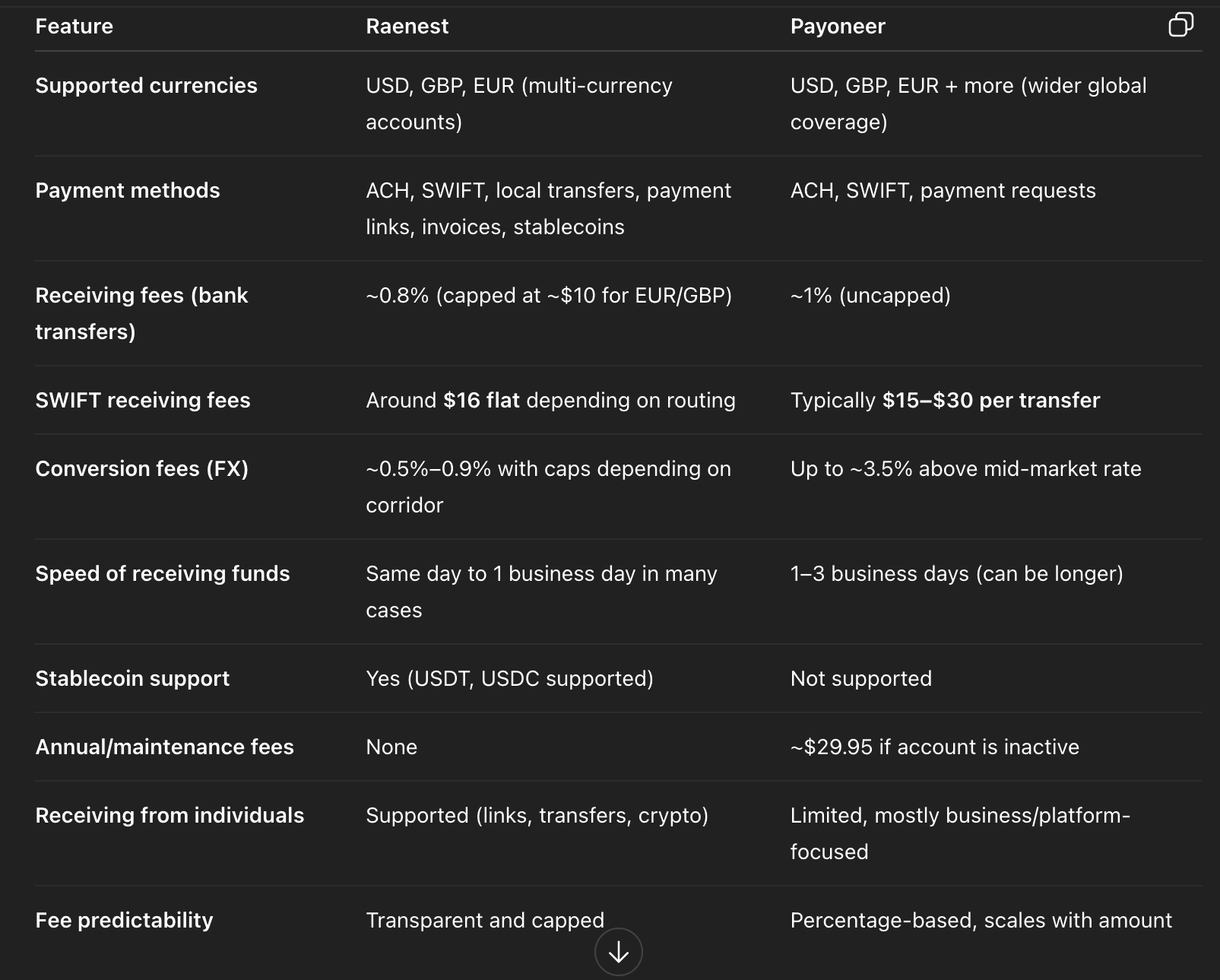
Practically:
If you receive $1,500 via Payoneer from a client and want to withdraw it to your local (NGN) bank account, the fees usually stack in layers. First, depending on how you were paid, you may lose about 1% ($15) on receipt. Then, when you withdraw to your bank account, Payoneer applies a cross-currency withdrawal fee of around 2% ($30) plus a small currency conversion margin. In a realistic mid-range scenario, your total cost lands around $45, meaning what finally hits your bank is roughly $1,455 worth in naira. The key thing is that these charges are applied at different stages, so the total cost builds up across the transaction.
Now take the same $1,500 with Raenest. You’re charged a flat ~0.35% transfer fee of $5.25, but because of the minimum, you pay $5 total. If there’s a currency conversion, the fee is still capped at a small amount, so your total cost typically stays around $5–$7. That means the recipient ends up with about $1,493–$1,495 equivalent in naira. In a real, like-for-like scenario, that’s a difference of roughly $38–$40 more lost on Payoneer, driven by multiple layers of fees rather than a single upfront charge.
🔗Wondering how you can link your Raenest compares to Cleva? Here’s how.
Raenest vs Payoneer – Sending Money/Transfer Comparison
Raenest charges a flat ~0.35% transfer fee with clear minimums and maximums depending on the payout method. USD transfers via ACH and domestic wires have low caps, while SWIFT transfers may include additional intermediary bank charges depending on the destination. GBP and EUR transfers follow a similar structure, and mobile money payouts across Africa are typically charged low flat fees. All fees are displayed upfront before confirming a transfer.
Payoneer’s fees vary more widely depending on the transfer type. Sending to a bank account typically costs around 1–3% of the transfer amount, depending on the country and currency involved. In some supported corridors, same-currency local transfers may attract a small fixed fee. High-volume users may qualify for custom pricing. Transfers between Payoneer users are often free within the same currency, with fees applied in certain cross-border or conversion scenarios.
Practically:
If you receive $1,000 via Payoneer from a client and want to withdraw it to your local (NGN) bank account, the fees usually stack in layers. First, depending on how you were paid, you may lose about 1% ($10) on receipt. Then, when you withdraw to your bank account, Payoneer applies a cross-currency withdrawal fee of around 2% ($20) plus a currency conversion margin. In a realistic mid-range scenario, your total cost lands around $30–$40, meaning what finally hits your bank is roughly $960–$970 worth in naira. The key thing is that these charges are applied at different stages, so the total cost builds up across the transaction.
Now take the same $1,000 with Raenest. You’re charged a flat ~0.35% transfer fee of $3.50, but because of the minimum, you pay $5 total. If there’s a currency conversion, the fee is still capped at a small amount, so your total cost typically stays around $5–$7. That means the recipient ends up with about $993–$995 equivalent in naira. In a real, like-for-like scenario, that’s a difference of roughly $25–$35 more lost on Payoneer, driven by multiple layers of fees rather than a single upfront charge.
Did you know you can pay for your cable TV, electricity, Internet and Airtime from your Raenest multicurrency account? It’s super fast and easy to use. Try it out
Raenest vs Payoneer – Card Fees
The Raenest virtual dollar card has a one-time creation fee (around $3). Funding the card and making transactions typically incur low, flat fees per transaction, keeping overall costs predictable. For cross-border payments on non-US websites, a small network fee may apply. Unlike Payoneer, Raenest’s card has no annual or maintenance fees, and there are no charges for moving funds back to your Raenest wallet. Monthly service is also free.
The Payoneer card is free to order with standard delivery, while express shipping via DHL costs $40. It carries an annual fee of $29.95 for the first card, with additional cards in other currencies offered at no extra cost. Transactions in the same currency are free in supported regions, but currency conversions can cost up to 3.5%. Cross-border transactions may attract fees of up to 1.8% depending on the setup. ATM withdrawals cost $3.15, balance inquiries cost $1, and card replacement costs $12.95.
Here’s the simple truth: Payoneer makes sense for some people, but if you’re a freelancer or remote worker looking to maximise your earnings, Raenest is the better choice. Ready to start receiving payments directly via Raenest? Create a Raenest account today.
FAQs
Is Raenest cheaper than Payoneer for receiving international payments?
Yes. Raenest charges flat or capped fees, making costs predictable, while Payoneer charges percentage-based fees that can stack across multiple steps.
Can I receive multiple currencies in Raenest?
Absolutely. Raenest allows you to hold USD, GBP, and EUR, making it ideal for freelancers and remote workers with international clients.
Does Payoneer offer instant payouts like Raenest FastTrack?
No. Payoneer payouts depend on the platform's processing times and the bank. Raenest FastTrack allows some payments (e.g., from Upwork) to arrive in less than an hour, even on weekends.
Are there hidden fees in Raenest?
No. All fees are displayed upfront before you confirm transfers. Currency conversion fees are transparent and often lower than those of Payoneer.