.jpg)

Raenest Stablecoin Vault Is Here: Earn up to 7% Yield on USDC & USDT


Money is changing.
The way we earn, receive, save, send, and spend it is no longer tied to a single currency or a single country. For people and businesses operating across borders, dollars can sit alongside naira, pounds, euros, and stablecoins, each playing a different role. And as the way we use money changes, the way we manage it should change too.
This optimal money management platform is what we’ve been building at Raenest: one place for your money, across currencies and across borders.
In that spirit, we built our initial stablecoin feature, and since then we've watched global earners use it to receive payments and businesses use it to settle with international partners. But we kept asking one question: "What if your stablecoins could do more?"
Today, they finally can.
Introducing Raenest Stablecoins Vault, with which you can now earn up to 7% variable APY on USDC and USDT balances directly within the Raenest app.
It gets even better: you can now also spend your stablecoins directly with your Raenest dollar card, and USDC and USDT now have their own dedicated wallets. Here’s what's new with stablecoins on Raenest, and how to start exploring it right away.
How Raenest Stablecoins Vault Works
Stablecoin Vault is a feature that lets you put your USDT or USDC to work and earn yield on your balance. It is available to eligible users across Raenest’s markets in Africa, Latin America, and Asia. Users can fund their Vault with USDC, USDT, USD, NGN, GBP, and other supported currencies, which are converted into the relevant stablecoin balance.
To start earning, you’ll need to move stablecoins from your wallet into your Stablecoin Vault. The minimum deposit is $100, and deposits typically process in about five minutes. 24 hours after you’ve made a deposit, your earnings start to accrue. These earnings are added to your balance daily, and they compound automatically. You can also decide to process a withdrawal at any time. Withdrawals typically process in about five minutes. Vault is designed to make earning yield a flexible part of managing money, with:
- Daily interest: Yield is paid out daily and automatically reflected in the user’s balance.
- No lock-up: Users can access, add to, or withdraw their funds at any time, 24/7.
- Flexible funding: Users can fund their Vault with stablecoins or supported fiat currencies, including USDC, USDT, USD, NGN, EUR and GBP. Terms and conditions apply Note that APY is variable and may change based on market conditions.
Want to see how Stablecoin Vault works before you get started? Watch this short video to learn how Raenest users can earn variable yield on eligible USDC and USDT balances, how to fund a Vault, and how to manage their stablecoins on Raenest.
🔗Looking to learn more about stablecoin yield and how it works? Read here.
How to move funds into your Stablecoin Vault
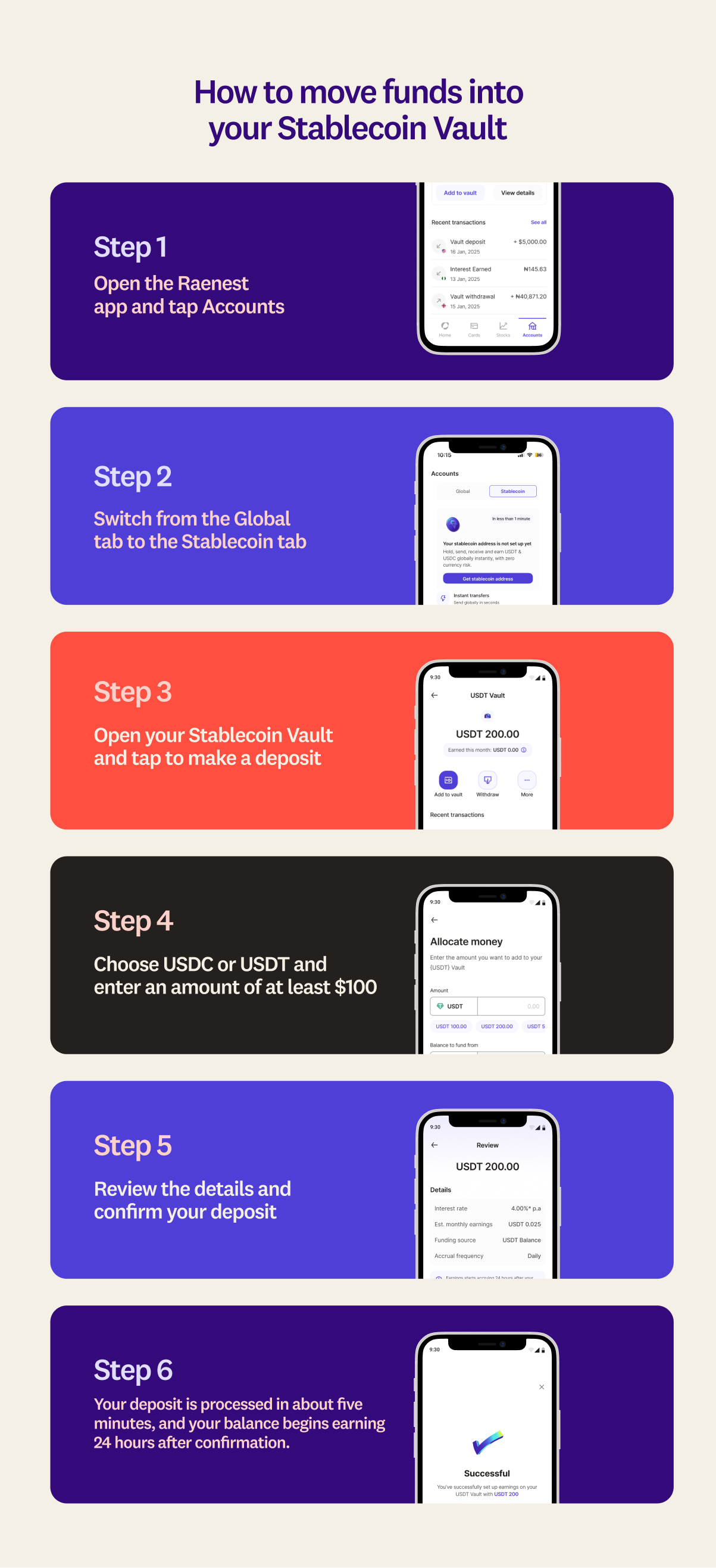
- Open the Raenest app and go to the Stablecoin tab.
- Open your Stablecoin Vault and tap to make a deposit.
- Choose USDC or USDT and enter an amount of at least $100.
- Review the details and confirm your deposit.
- Your deposit is processed in about five minutes, and your balance begins earning 24 hours after confirmation.
How to withdraw funds from your Stablecoin Wallet
You can withdraw from your Stablecoin Vault whenever you want, and your withdrawal includes your original deposit plus all your earnings. Each withdrawal carries a fee of $2 + 0.3% (percentage fee capped at $20). To withdraw:
- Open the Raenest app and go to the Stablecoin tab.
- Open your Stablecoin Vault and tap Withdraw.
- Enter the amount you want to withdraw. The minimum amount is 2 USDC or 2 USDT.
- Review the details and confirm.
- Your funds move back into your matching stablecoin wallet: USDC to your USDC wallet, USDT to your USDT wallet.
More ways to manage stablecoins on Raenest
Until now, your stablecoins were part of your USD account, without a balance of their own or a separate transaction history. When you received USDC or USDT, it was automatically converted to USD.
Now, you have a dedicated place to manage your stablecoins. Under the new Stablecoin tab on your Accounts page, you can create dedicated USDC and USDT wallets to receive and hold your stablecoins in their original form.
From there, you can:
- Receive and hold USDC and USDT in dedicated wallets, with your balances and transaction history in one place.
- Send USDC and USDT across supported networks when you need to move money across borders.
- Convert between stablecoins and fiat currencies as your needs change.
- Spend directly from your stablecoin balances with your Raenest Card, alongside your USD, GBP, EUR, and NGN balances.
It’s a simpler way to manage your stablecoins alongside the other currencies you already use, from receiving and holding to sending, converting, and spending.
How to open your stablecoin wallet
.jpg)
Before you can receive, convert, spend, or earn, you need a wallet for the stablecoin you want to use. Setting one up takes less than a minute.
- Download/Open the Raenest app and tap Accounts.
- Switch from the Global tab to the Stablecoin tab.
- Tap the stablecoin you want, USDC or USDT, and follow the prompt to create the wallet.
- Once it is created, the wallet appears on your Stablecoin tab with its own balance and address, plus a full transaction history.
You can set up both a USDC and a USDT wallet, and each one keeps its own balance and transaction history.
How to receive stablecoins and find your wallet address
Once your wallet is set up, it has its own address, which you use to receive USDC or USDT from anyone. Here is where to find it.
- On the Stablecoin tab, select the wallet you want, USDC or USDT.
- Your wallet address appears on the card.
- Tap the address to copy it.
- Share it with whoever is paying you, or use it to move funds in from another wallet.
Always confirm the sender is using a network your wallet supports, so the funds arrive correctly. Need more clarity? Here’s a detailed guide to receiving USDC or USDT on Raenest.
How to convert between stablecoins and your other currencies
Moving between your stablecoins and your currency balances happens inside the Convert flow you already use. USDC and USDT now appear in both the You convert and You get fields.
- Tap Convert.
- In the You convert field, choose what you are converting from.
- In the You get field, choose what you want to receive.
- Enter the amount. The rate, fee, and estimated arrival time all show before you confirm.
- Review the details and confirm.
Conversion costs: Conversions between USD and USDC or USDT cost 0.50%. Conversions between any other currency, including GBP, EUR, and NGN, and USDC or USDT incur a 0.70% fee. The exact fee always shows before you confirm, so there are no surprises.
How to send stablecoins to an external wallet
Converting keeps your money inside Raenest. Sending takes it out. Stablecoin now appears as a receiver type in Send Money, alongside Bank Account, Mobile Money, and Raenest Tag, so you can send USDC or USDT using the same flow you use for other transfers.
- Tap Send Money and choose Stablecoin as the receiver type.
- Select the currency, USDC or USDT, and the network you want to send on.
- Enter the recipient wallet address and a name for them, or pick a receiver you have saved.
- Enter the amount.
- Check the full summary, then enter your password to confirm.
You can send across supported networks, including Ethereum, Binance, Solana, and Polygon.
What sending costs. An outbound stablecoin send can carry up to three charges:
- Stablecoin send fee: $2 + 0.3% (percentage fee capped at $20)
- Network or gas fee: charged by the network to settle your transaction on-chain. This changes with the network and the amount, so it is not fixed.
- Conversion fee: applies only when your send involves converting a currency balance into stablecoin first. It follows the same conversion rates shown above.
How to spend USDC and USDT directly with your Raenest card
When you set up a payment, you simply choose which balance to pay from, and your USDC or USDT is right there as an option. You don't have to convert to USD first, and you still don't pay card funding fees. Your card draws directly from your stablecoin balance and works anywhere Visa is accepted, across more than 150 million merchants in-store and online.
Ready to put your idle stablecoins to work? Create your Raenest account or open the app to get started.
Frequently asked questions
- What is the Raenest Stablecoin Vault?
It is a way to earn yield on your idle USDC and USDT. You move stablecoins into your Stablecoin Vault, and your balance earns yield that compounds daily.
- Is my return guaranteed?
No. The APY shown is an estimate based on current market conditions and can move up or down. Your Stablecoin Vault is not a bank account or a savings account.
- How much do I need to start earning in Raenest Vault, and when do I earn?
The minimum deposit is $100. Deposits are processed in about five minutes, and your funds begin earning 24 hours after your deposit is confirmed.
- Can I withdraw whenever I want?
Yes. Withdrawals are processed in about 5 minutes and include your original deposit plus all earnings.
- Which stablecoins can I use on Raenest?
USDC and USDT.
- Do I need to convert my stablecoins before I can spend them with my card?
No. Your Raenest card spends your USDC or USDT balance directly, with no card funding fees, anywhere Visa is accepted.
- Where do my incoming stablecoins go now?
Into their matching wallet on the Stablecoin tab. Incoming USDC and USDT are no longer automatically converted to USD.
- What does it cost to convert stablecoins?
0.50% between USD and USDC or USDT, and 0.70% between any other currency and USDC or USDT. The fee always shows before you confirm.
- What does it cost to send stablecoins?
Raenest charges $2 + 0.3% per stablecoin send, with the percentage fee capped at $20. Network or gas fees and applicable conversion fees may also apply.
- Which networks can I send on?
Supported networks include Ethereum, Binance, Solana, and Polygon. The networks available to you appear when you set up the send.
.jpg)
